

Share an app, not your whole machine
Share one localhost app over Tailscale through its own TSLink node. See what each node exposes and what changes if the host also runs Tailscale.
One node for each registered app
One app, not the whole machine. With no separate host Tailscale connection, TSLink exposes each app's configured target through its own embedded node, without adding other host ports. Independent routes and other gateways on the host are outside this statement; review them separately. A proxy target may also be a non-local address reachable by the daemon. See architecture, proxy configuration, Tailscale tsnet and the tsnet package overview.
The nodes have distinct identities but run in one shared daemon. They do not create separate execution environments or reduce the daemon's OS-user privileges. An app may itself provide host administration, file access or other powerful operations. See architecture.
Follow a request from phone to app
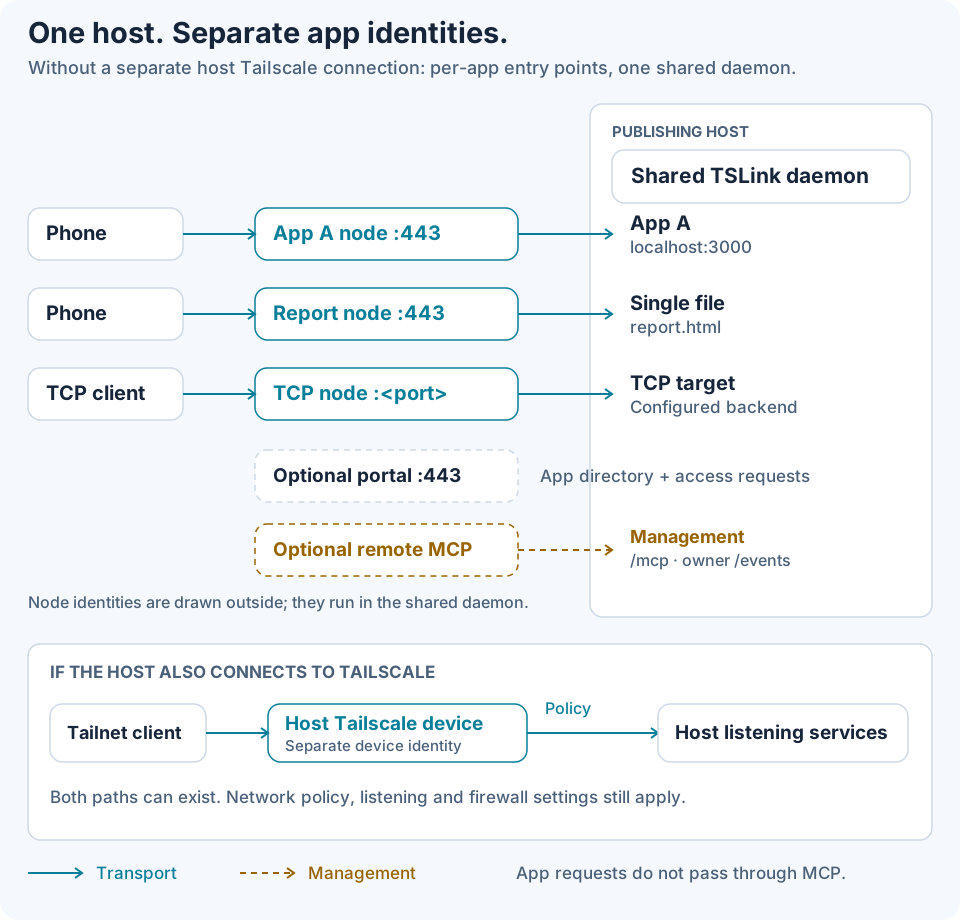
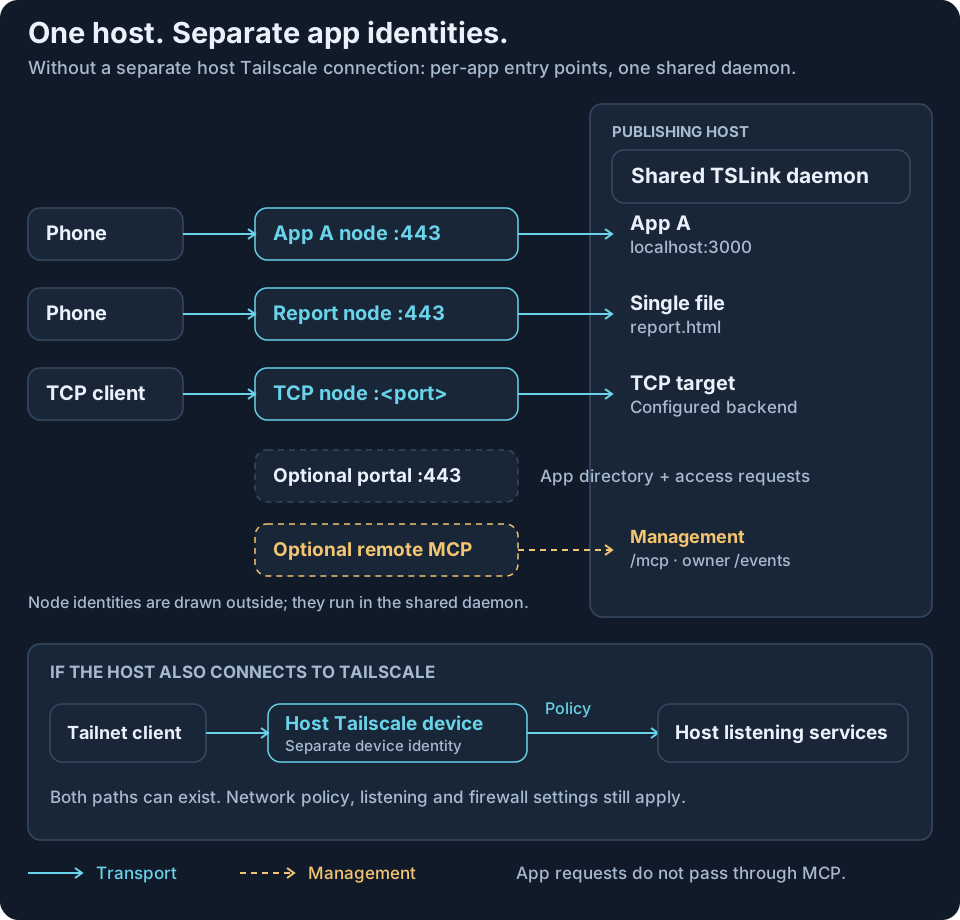
Solid transport arrows follow phone → app A node:443 → localhost:3000, phone → report node:443 → report.html and TCP client → TCP node:<port> → target. The identities are drawn outside the host box for clarity; they are embedded in its shared daemon. Dashed arrows denote management. App requests do not pass through MCP. See request paths, MCP setup and Tailscale access controls.
What each listener exposes
| Entry point | What it makes available |
|---|---|
| HTTP proxy/file app node | HTTPS on node port 443, the selected proxy or file handler, authorization and request middleware. A proxy includes its configured backend's reachable routes and functions. Explicit public Funnel uses that node's port 443. App management · Tailscale Funnel |
| TCP app node | One private listener on the configured port, 443 if unspecified, forwarding to its TCP target. No HTTP --allow/people checks or HTTPS termination: use network policy and backend authentication. TCP behavior · Tailscale access controls |
| Directory or single file | A directory share serves its subtree and may list directories. A regular-file share serves only the selected filename, redirects / with 302 and returns 404 for siblings/other paths. Directory opens use an anchored OS root; traversal and symlinks escaping that root are rejected. Contents remain live; hard links inside the served tree are ordinary served files. File sharing |
| Optional portal | A separate embedded HTTPS node on 443, serving the app directory /, filtered /api/apps and access-request handling. It is not added to every app node; sharing the portal node does not make app nodes reachable. Portal · Tailscale device sharing |
| Optional remote MCP | Off by default, on a separate private HTTPS node with /mcp and an optional owner /events stream. It is not an app listener and is not published through Funnel. MCP setup · MCP roles |
Backend health probes contact the configured backend directly; file checks inspect the configured directory/file. App-node assembly adds no TSLink health/admin HTTP route. An app's own health route remains part of its proxy target. See health checks and architecture.
Local MCP uses stdio. Each embedded node's LocalClient is node-local control, not a tailnet control socket; TSLink does not invoke the optional tsnet Loopback listener. Publishing does not need the system Tailscale installation or shell out to its CLI, but doctor can read a system client's SSH preference through LocalAPI; absence or timeout becomes unknown. See MCP setup, diagnostics, LocalClient and Loopback.
Compare a separate Tailscale connection on the host
Compare network entry points. Ordinary Tailscale adds a device, and policy governs reachable device/port combinations. Its listening services also depend on their listening and firewall settings; not every port, process or file automatically becomes available. TSLink adds app-node listeners without requiring that separate host connection. If both run, both paths exist. See the tsnet package overview and Tailscale access controls.
Set per-app access rules
For a private HTTP app:
tslink add agent-ui --proxy localhost:3000 --allow you@example.com
tslink url agent-ui --wait
Complete enrollment and any approval when required. Separate identities permit separate network rules; optional TSLink --allow/people rules add HTTP/file checks. Default private sharing is not automatically owner-only. Portal owner/admin identities can open all private HTTP/file apps, subject to network policy and app login. See first private share, people sharing and portal permissions.
Fresh credential-free nodes do not advertise tags, so do not assume tag-based rules are active. Raw TCP needs network policy and backend authentication. See credentials, architecture, Tailscale tsnet and access controls.
What TSLink does not restrict
TSLink does not constrain processes, filesystem privileges, an app's own capabilities or independently exposed LAN/host routes. It does not replace app authentication, and the portal is not a shortcut around network access requirements. A proxy publishes whatever its chosen backend makes available. See architecture, proxy targets and portal access.
For a practical flow, try an agent UI from your phone or a single HTML report with a deadline.
Official Tailscale sources linked above: accessed 2026-10-07. Product behavior: TSLink v0.1.1.
HTML report with a deadline
Share one HTML report privately with named Tailscale users, with access that expires at a deadline. Learn file limits, revocation, and the separate browser guest-link option.
Health and alerts
Check backend readiness, see expiry warnings, opt into owner alerts and configure finite upload limits.